 AppDuo中文
PRACTICAL GUIDE · 2026-10-03
Separate macOS notifications for WeChat clones
See real notifications from WeChat and its clone, enable permissions and troubleshoot Focus, running state and app compatibility.
When the target app is compatible and permissions allow it, the original WeChat and AppDuo clones can receive notifications for their respective accounts. AppDuo is not a push service and does not guarantee notifications after the app has quit.
Real notification example
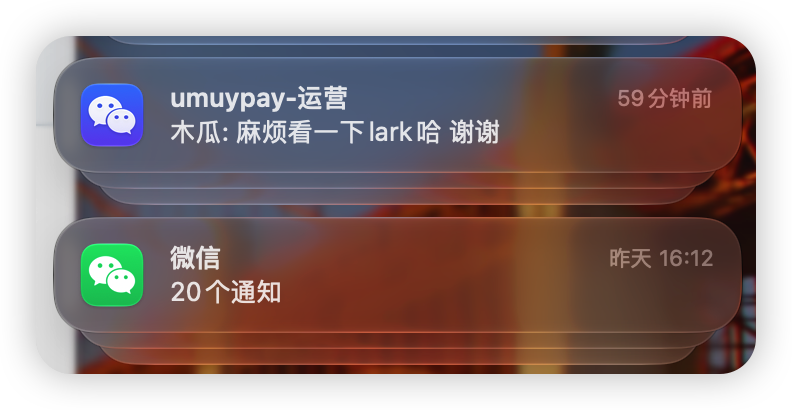
This user-provided screenshot shows two WeChat instances. Notification headings may show a conversation or app name, depending on WeChat and macOS registration.
Enable and verify
- Open the original app and clone and confirm they use different accounts.
- Enable new-message notifications within each app and check that the conversation is not muted.
- In macOS System Settings → Notifications, check the relevant app entries, notification permission, banners, sound and previews.
- Check whether Focus blocks alerts. Keep the apps running during testing.
- Send a non-sensitive test message to each account and confirm the source icon and intended account. An icon alone does not prove isolation.
If a clone receives no notifications
- Confirm notifications work in the original app, then check both in-app and system permissions for the clone.
- If an older AppDuo version created the clone, quit it normally and try updating it with a newer release. Updates normally retain configuration, icons and data; back up important data.
- Prefer the recipe's automatic injection mode. Explicit launcher mode and apps requiring special launch arguments may have notification compatibility limits.
- Report macOS, WeChat and AppDuo versions, cloning mode and reproduction steps. Remove private messages from screenshots.
WeChat updates can change notification behavior. This example does not prove compatibility with every application or version. A three-identity setup needs permissions and testing for each identity.